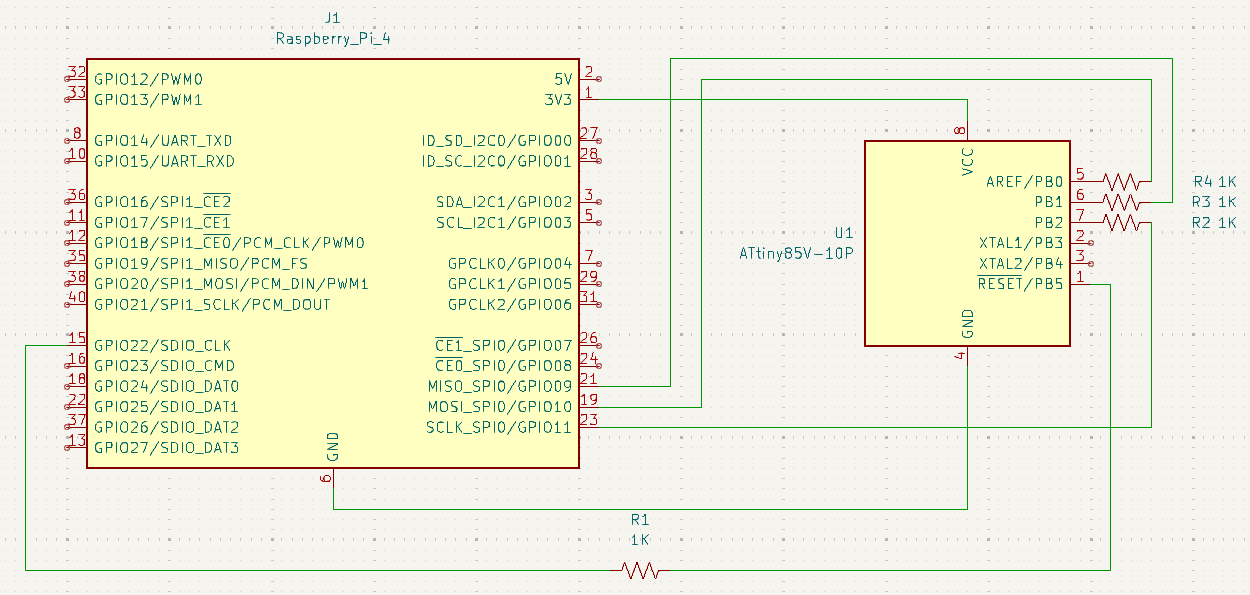
AVRs are programmable by the SPI, and Raspberry Pi's just happen to (sort of) expose an SPI interface in their 40-pin GPIO headers.
In that case simply add
dtparams=spi=on...to (the end of) /boot/config.txt and reboot.
Incidentally, before you edit config.txt...
lsmod | grep spi...probably won't yield any results, but after the config.txt change (and reboot!) you should see a couple modules with spi in their names. Success!
 Save yourself time and get one of these breadboard adaptors.

And on a new Void installation you'll need...
xbps-install -Su base-devel autoconf-archive avrdude...to build the GPIO tools...
./autogen.sh
./configure --prefix=$HOME
And avrdude is a Swiss army knife utility for working with AVR which you will need for flashing your ATtiny and more.
gpioset -s GPIO22=0 &Notice the preceding leaves gpioset running in the background so you can do other things. This is necessary because only while gpioset is running can it keep GPIO22 pulled low; when it exits there are no guarantees about the state of GPIO22. Then...
avrdude -p t85 -P /dev/spidev0.0:/dev/gpiochip0 -c linuxspi -B 500 -U flash:w:main.hex
fg
The fg command will foreground gpioset which you can now just kill with ctrl-c. You might also want to...
gpioset -s GPIO22=1...to insure RESET is no longer pulled low. (And, no, you don't have to use GPIO22.)
The "t85" is for the ATtiny85 I'm using; adjust that for your μP. Congratulations! Assuming the terminal output was positive, you just programmed your ATtiny's flash memory with whatever was the content of main.hex.
If you're dealing with hardware interfacing you're going to encounter permissions obstacles, and you will either have to prefix everything with sudo or add your (normal) user account to various groups, or...some other workaround to touch GPIO.
It's easier to just run as root. Normally this would be very bad advice, and, yes, you can still shoot yourself in the foot doing this, but in a context like this wherein:
So get yourself a good assembler...
xbps-install avra...and learn what it means to know exactly what your computer will do.
avr -I /usr/include/avr main.asm...will emit a variety of files. The plain *.hex is what you'll load with avrdude.
avr-gcc, avr-binutils avr-libc are also options, and Microchip provides their own compiler, too.